Autoscale sizes your site to its traffic. Rather than running on a server you choose in advance and hope is large enough, your application runs on capacity the platform adds as demand rises and removes as it falls, while the site keeps serving.
Everything else on this page follows from that. Capacity that comes and goes has to be interchangeable, which means the running copies of your site cannot hold anything of their own: no local files, no local state, no code changed in place. The read-only filesystem and the Git-based deployment workflow are consequences of scaling, not separate rules layered on top of it.
This page explains how the pieces fit together and why they are arranged this way. It does not cover setup or day-to-day tasks. See the Autoscale overview for those.
Architecture overview
Section titled “Architecture overview”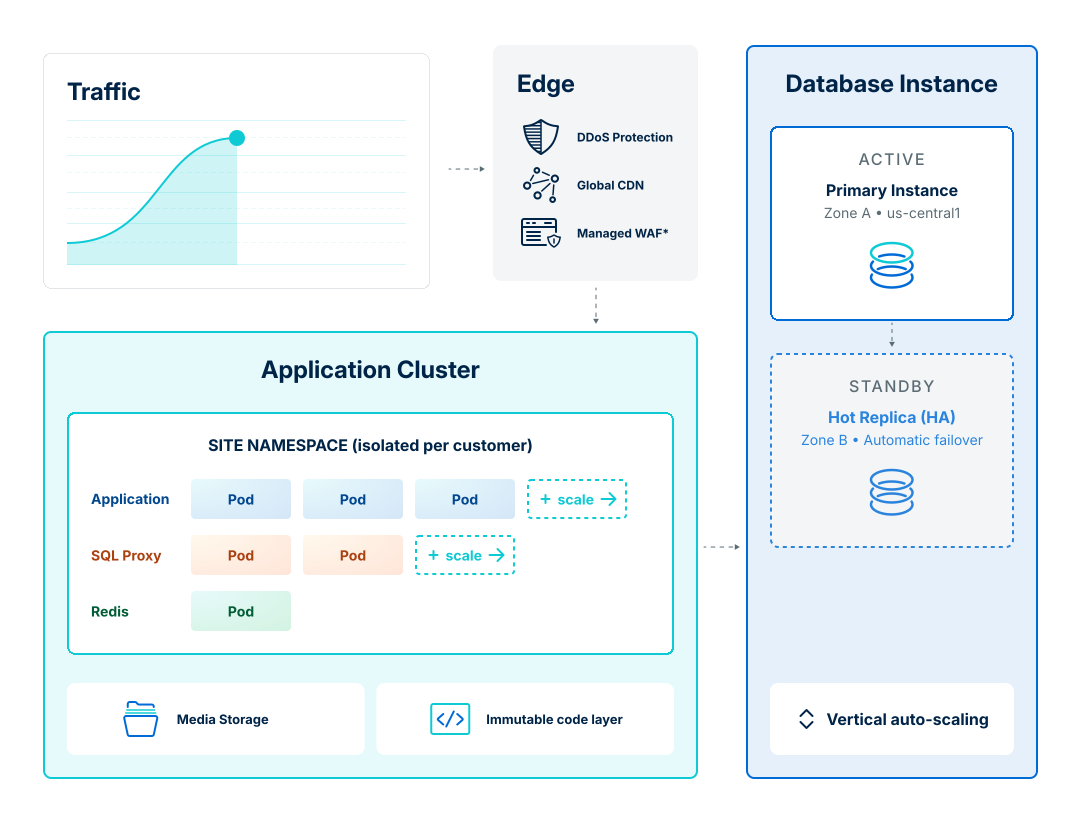
Autoscale runs on Google Cloud, with Cloudflare providing the edge. A request passes through three layers:
- Edge: DDoS protection, global content delivery network (CDN) caching, and a managed web application firewall (WAF), all before traffic reaches your application.
- Application cluster: your site's pods running Nginx and PHP, isolated in a namespace of their own, along with the object cache and database proxy that serve them.
- Database: a single managed instance with a standby replica in a second zone.
The layers scale independently, and they do not all scale the same way.
Two kinds of scaling
Section titled “Two kinds of scaling”Understanding Autoscale mostly means understanding which parts scale out and which scale up.
Horizontal scaling adds more copies of something. When traffic rises, Autoscale runs more application pods, each identical to the last, and spreads requests across them. There is no practical ceiling. You add copies until demand is met.
Vertical scaling makes one thing bigger. The database moves to a larger machine with more CPU and memory. There is a ceiling, and changing size is a slower, more disruptive operation than adding a pod.
Autoscale uses horizontal scaling for the application tier and vertical scaling for the database.
Cacheable responses are served from Cloudflare's global network and never reach your application at all. This is the cheapest possible way to absorb a traffic spike: requests that terminate at the edge cost you no pod capacity.
Every Autoscale environment runs on WP Engine's Advanced Network. Along with caching, it handles DDoS mitigation, bot management, and a managed WAF, so malicious traffic is filtered before it can consume application resources.
Application cluster
Section titled “Application cluster”Each environment gets its own namespace, an isolated slice of the cluster containing that site's workloads. Nothing is shared between customers at this layer.
Inside the namespace:
- Application pods run Nginx and PHP together. These are what scale horizontally: under load the platform adds pods, and as load subsides it removes them.
- A database proxy manages connections between the application pods and the database, and scales with them.
- An object cache stores the results of expensive database queries so the same work is not done twice.
Scaling out is aggressive and scaling in is cautious. The platform adds capacity quickly when demand rises, then removes it slowly, so a brief lull during a spike does not strip away capacity you are about to need again.
Pods are ephemeral
Section titled “Pods are ephemeral”Any individual pod can disappear at any time. It might be removed because traffic dropped, replaced during a deployment, or rescheduled onto a different node. Nothing written to a pod's local filesystem survives, and nothing stored in one pod's memory is visible to the others.
This is the single most important architectural fact for developers, and it is why the next two sections look the way they do.
Storage and the code layer
Section titled “Storage and the code layer”Pods keep nothing of their own, so anything that has to persist lives somewhere else. For WordPress that comes down to two things: where the application can write, and where its code comes from.
Media is external. /wp-content/uploads/ is the one path a WordPress install can write to, and it is not part of the pod. Every pod mounts the same shared storage at that path, so a file uploaded through one pod is immediately available to all of them and survives any pod being replaced. Files there are served as media and never executed as code.
Code is immutable. Every deployment builds an image containing your themes, plugins, and must-use plugins, and mounts it read-only on every pod. WordPress core is mounted separately and managed by WP Engine, so core files never live in your repository. Nothing on the running site can change that image, which is why there is no SFTP access and no file editing in WP Admin.
Read-only code is what keeps horizontal scaling coherent. Identical replicas are the premise of adding pods, and a pod that could edit its own code would stop matching the others.
Two things follow. Autoscale requires Pipelines rather than offering it as an option, because a Git-based build is the only way code can change. And "code up, content down" stops being a convention your team maintains and becomes a property of the platform. See WordPress on Autoscale for what that means day to day.
Object cache
Section titled “Object cache”Caching is part of how Autoscale scales: work that is not repeated is capacity you do not have to add. The edge does this for whole pages, and the object cache does it for the queries and computed values a page assembles once it reaches your application.
Those values are stored in Redis, shared by every pod in the namespace, so work done for one request is reused by all the others. Sharing is what makes it worth having here. A cache local to a single pod would warm up separately on every pod and be thrown away whenever that pod was replaced.
Autoscale supplies the object cache through Object Cache Pro and the Relay client, installed by the platform and always on.
Database
Section titled “Database”The database is a single managed instance, and it scales vertically, moving to a larger machine rather than splitting across several.
This is a deliberate trade. Scaling a database horizontally means either read replicas, which introduce replication lag that WordPress does not expect, or multi-writer replication, which adds synchronization latency to every write and creates conflict-resolution problems. WordPress assumes one authoritative database that reads its own writes immediately. Vertical scaling preserves that assumption.
The cost is that resizing is not instantaneous the way adding a pod is. The platform monitors sustained load and moves to a larger tier when demand warrants it. This is a measured response to a rising trend, not an immediate reaction to a momentary spike.
For availability, a standby replica runs continuously in a second zone. If the primary fails, the platform fails over automatically.
Deployments
Section titled “Deployments”Deployments use a canary rollout. New pods are introduced gradually alongside the existing ones, take a share of live traffic, and are checked for health before the rollout proceeds. If new pods fail their health checks, the rollout stops rather than replacing a working site with a broken one.
Two consequences worth knowing:
Both versions are briefly live at once. During a rollout, some requests are served by pods running the previous code and some by pods running the new code, and both are reading and writing the same database. If a deployment changes database schema or option structure, both versions will see the change. Design migrations to tolerate that overlap.
Recovery is a new deployment. Once a rollout completes, the previous pods are gone. Returning to an earlier version means deploying that version again, which takes a full deployment cycle rather than an instant switch.
What this means for your application
Section titled “What this means for your application”Almost everything Autoscale asks of your application comes back to the same requirement: the platform has to be free to add and remove copies of your site at any moment. That means state belongs in the database, the object cache, or object storage, never on local disk or in pod memory. It also means every code change goes through a Git-based deployment.
Looking for support?
Find additional resources in our Support Center, or log in to chat with our support team.